Email Inbox
Aiviro provides a set of actions for working with emails — fetching, sending, creating drafts, managing messages, and organizing folders. All actions are stateless and support multiple authentication methods (IMAP basic, Outlook OAuth2, Exchange OAuth2, Exchangelib).
Instead of sending an email directly, CreateEmailDraftAction saves the prepared
message into the mailbox’s Drafts folder for a human to review and send from their own mail
client. Exchange and Outlook (OAuth2) accounts save the draft server-side into the account’s
own Drafts folder; classic SMTP/IMAP accounts store it over IMAP with a configurable
drafts_folder name (IMAP providers differ, e.g. Drafts vs INBOX.Drafts) — this
path requires the email account to have its IMAP (receiving) configuration set.
Outlook OAuth2
Note
Microsoft Graph distinguishes two types of permissions, which are not interchangeable:
In terms of the configs above: the *OutlookOAuth2ConfidentialConfig classes (client secret) use the Application permissions, the *OutlookOAuth2PublicConfig classes (interactive login) use the Delegated ones.
Important
Application permissions are always required. The automation runs unattended and authenticates with the Client Secret, so it is the Application permissions that are used in every real deployment.
Delegated permissions are optional, and they are not an alternative to the Application permissions. Add them on top of the Application permissions only if you also want to log in interactively as a user (e.g. to test the configuration). If you don’t need the interactive login, skip them and step 4 entirely.
Permission |
Application (required) |
Delegated (optional, interactive login only) |
|---|---|---|
|
✅ |
✅ |
|
✅ |
✅ |
|
❌ (not needed, see the shared mailbox note below) |
✅ for a shared mailbox |
|
❌ (not needed, see the shared mailbox note below) |
✅ for a shared mailbox |
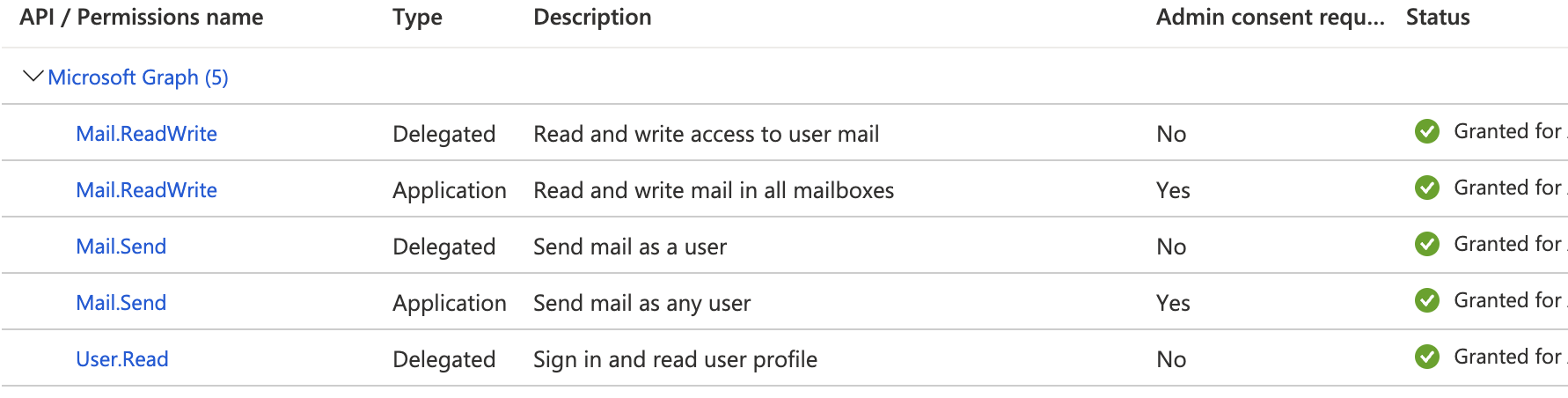
Correct configuration in Azure portal - Application permissions with granted admin consent, plus the optional Delegated ones.
Warning
Important, as Application permissions allow the app to access any mailbox, Administrators can configure application access policy to limit app access to specific mailboxes and not to all the mailboxes in the organization.
If you need access to a shared mailbox (e.g. orders@customer.com), no extra *.Shared Application permission is needed. Instead, the application access policy needs to be applied to a security-group into which the shared mailbox and user belong to.
More info can be found here.
Actions
Action for fetching emails via IMAP.
- class aiviro.actions.email.fetch.FetchEmailsAction(config: ~types.Annotated[~aiviro.actions.email.configs.IMAPBasicConfig | ~aiviro.actions.email.configs.IMAPOutlookOAuth2PublicConfig | ~aiviro.actions.email.configs.IMAPOutlookOAuth2ConfidentialConfig | ~aiviro.actions.email.configs.IMAPExchangelibConfig, FieldInfo(annotation=NoneType, required=True, discriminator='kind')], folder: str | None = None, limit: int | None = None, seen: bool | None = None, attachment_writer: ~aiviro.actions.email.attachments.AttachmentWriter = <aiviro.actions.email.attachments.AttachmentMemoryWriter object>)
Stateless action that fetches emails from a mailbox folder.
- Parameters:
config – IMAP authentication configuration.
folder – Folder to fetch from. Defaults to the initial folder configured in the IMAP config (usually
"INBOX").limit – Maximum number of emails to fetch.
Nonemeans no limit.seen – If True, fetch only seen (read) emails. If False, fetch only unseen (unread) emails. If None, fetch all emails. Default None.
attachment_writer – Storage strategy for fetched attachments’ content. Defaults to keeping content in memory (
EmailAttachment.content); pass anAttachmentFileWriter(base_dir=...)to write attachments to disk and getEmailAttachment.content_pathinstead.
- Example:
>>> import aiviro
>>> from aiviro.actions.email import FetchEmailsAction, IMAPBasicConfig
>>>
>>> r = aiviro.create_desktop_robot()
>>> config = IMAPBasicConfig(server="imap.example.com", username="user", password="pass")
>>>
>>> # Fetch the 5 newest unread emails from INBOX
>>> emails = FetchEmailsAction(config=config, limit=5, seen=False)(robot=r)
>>> for email in emails:
...     print(email.subject, email.sender.address)
>>>
>>> # Fetch all emails from a specific folder
>>> emails = FetchEmailsAction(config=config, folder="Archive/2024")(robot=r)
Action for sending emails via SMTP.
- class aiviro.actions.email.send.SendEmailAction(config: Annotated[SMTPBasicConfig | SMTPOutlookOAuth2PublicConfig | SMTPOutlookOAuth2ConfidentialConfig | SMTPExchangelibConfig, FieldInfo(annotation=NoneType, required=True, discriminator='kind')], recipients: str | tuple[str, str] | list[str | tuple[str, str]], subject: str, message: str, attachments: Sequence[str | Path | EmailAttachment] | None = None, cc: str | tuple[str, str] | list[str | tuple[str, str]] | None = None, bcc: str | tuple[str, str] | list[str | tuple[str, str]] | None = None, reply_msg: EmailMessage | None = None, sender_email: str | None = None, message_as_html: bool = False)
Stateless action that sends an email via SMTP.
- Parameters:
config – SMTP authentication configuration.
recipients – One or more recipients in format
"email"or("fullname", "email").subject – Subject of the message.
message – Content of the message (plain text or HTML).
attachments – Optional list of file paths or
EmailAttachmentobjects to attach.cc – Carbon copy recipients, same format as recipients.
bcc – Blind carbon copy recipients, same format as recipients.
reply_msg – If this message is a reply, include the original
EmailMessageto set proper headers.sender_email – Override the sender address (e.g. shared mailbox).
message_as_html – If
True, message is treated as HTML.
- Example:
>>> import aiviro
>>> from aiviro.actions.email import SendEmailAction, SMTPBasicConfig
>>>
>>> r = aiviro.create_desktop_robot()
>>> config = SMTPBasicConfig(server="smtp.example.com", username="user", password="pass")
>>>
>>> # Send a simple plain-text email
>>> SendEmailAction(
...     config=config,
...     recipients="recipient@example.com",
...     subject="Hello",
...     message="This is the email body.",
... )(robot=r)
>>>
>>> # Send an HTML email with attachments and CC
>>> SendEmailAction(
...     config=config,
...     recipients=[("John Doe", "john@example.com"), "jane@example.com"],
...     subject="Report",
...     message="<h1>Monthly Report</h1><p>See attachment.</p>",
...     attachments=["path/to/report.pdf"],
...     cc="manager@example.com",
...     message_as_html=True,
... )(robot=r)
Action for creating email drafts, for later manual review and sending.
- class aiviro.actions.email.draft.CreateEmailDraftAction(config: Annotated[SMTPBasicConfig | SMTPOutlookOAuth2PublicConfig | SMTPOutlookOAuth2ConfidentialConfig | SMTPExchangelibConfig, FieldInfo(annotation=NoneType, required=True, discriminator='kind')], recipients: str | tuple[str, str] | list[str | tuple[str, str]], subject: str, message: str, attachments: Sequence[str | Path | EmailAttachment] | None = None, cc: str | tuple[str, str] | list[str | tuple[str, str]] | None = None, bcc: str | tuple[str, str] | list[str | tuple[str, str]] | None = None, reply_msg: EmailMessage | None = None, sender_email: str | None = None, message_as_html: bool = False, imap_config: Annotated[IMAPBasicConfig | IMAPOutlookOAuth2PublicConfig | IMAPOutlookOAuth2ConfidentialConfig | IMAPExchangelibConfig, FieldInfo(annotation=NoneType, required=True, discriminator='kind')] | None = None, drafts_folder: str = 'Drafts')
Stateless action that creates an email draft instead of sending it.
The draft lands in the mailbox’s own Drafts folder for a human to review, edit, and send from their normal mail client — no separate approval step is built into aiviro-core. How “draft” is implemented depends on the backend behind config:
Exchangelib / Outlook OAuth2: saved server-side via the same account used for sending, exactly like composing a draft in Outlook.
Basic (plain SMTP/IMAP): plain SMTP has no draft concept, so the message is instead written directly into the mailbox’s Drafts folder over IMAP. This requires a companion imap_config for the same mailbox — omitting it raises
ValueError. If the Drafts folder is named differently on your server (e.g."INBOX.Drafts"), pass it via drafts_folder; useListFoldersActionorGetFolderDelimiterActionto find the correct name.
- Parameters:
config – SMTP authentication configuration (identifies the mailbox and, for Exchangelib/Outlook OAuth2, is also used to store the draft).
recipients – One or more recipients in format
"email"or("fullname", "email").subject – Subject of the message.
message – Content of the message (plain text or HTML).
attachments – Optional list of file paths or
EmailAttachmentobjects to attach.cc – Carbon copy recipients, same format as recipients.
bcc – Blind carbon copy recipients, same format as recipients.
reply_msg – If this message is a reply, include the original
EmailMessageto set proper headers.sender_email – Override the sender address (e.g. shared mailbox).
message_as_html – If
True, message is treated as HTML.imap_config – Required when config is an
SMTPBasicConfig— IMAP configuration for the same mailbox, used to write the draft into the Drafts folder. Ignored for other backends.drafts_folder – Name of the Drafts folder, Basic auth only. Defaults to
"Drafts".
- Raises:
ValueError – If config is an
SMTPBasicConfigand imap_config is not provided.TypeError – If config is an
SMTPBasicConfigand imap_config does not resolve to anIMAPBasicConfig— Basic SMTP auth can only draft via a Basic IMAP connection to the same mailbox.
- Example:
>>> import aiviro
>>> from aiviro.actions.email import CreateEmailDraftAction, SMTPExchangelibConfig
>>>
>>> r = aiviro.create_desktop_robot()
>>> config = SMTPExchangelibConfig(
...     server="outlook.office365.com", username="user", password="pass",
...     email_address="user@example.com",
... )
>>> draft = CreateEmailDraftAction(
...     config=config,
...     recipients="recipient@example.com",
...     subject="Hello",
...     message="This is the email body.",
... )(robot=r)
>>> print(draft.subject)
Hello
Actions for managing emails (move, copy, delete, set seen).
- class aiviro.actions.email.manage.MoveEmailAction(config: Annotated[IMAPBasicConfig | IMAPOutlookOAuth2PublicConfig | IMAPOutlookOAuth2ConfidentialConfig | IMAPExchangelibConfig, FieldInfo(annotation=NoneType, required=True, discriminator='kind')], message: EmailMessage, destination_folder: str)
Stateless action that moves an email to another folder.
- Parameters:
config – IMAP authentication configuration.
message – Email message to move.
destination_folder – Target folder path. Defaults to
"INBOX".
- Example:
>>> import aiviro
>>> from aiviro.actions.email import FetchEmailsAction, MoveEmailAction, IMAPBasicConfig
>>>
>>> r = aiviro.create_desktop_robot()
>>> config = IMAPBasicConfig(server="imap.example.com", username="user", password="pass")
>>> emails = FetchEmailsAction(config=config, limit=1, seen=False)(robot=r)
>>> MoveEmailAction(config=config, message=emails[0], destination_folder="Archive")(robot=r)
- class aiviro.actions.email.manage.CopyEmailAction(config: Annotated[IMAPBasicConfig | IMAPOutlookOAuth2PublicConfig | IMAPOutlookOAuth2ConfidentialConfig | IMAPExchangelibConfig, FieldInfo(annotation=NoneType, required=True, discriminator='kind')], message: EmailMessage, destination_folder: str)
Stateless action that copies an email to another folder.
- Parameters:
config – IMAP authentication configuration.
message – Email message to copy.
destination_folder – Target folder path. Defaults to
"INBOX".
- Example:
>>> import aiviro
>>> from aiviro.actions.email import FetchEmailsAction, CopyEmailAction, IMAPBasicConfig
>>>
>>> r = aiviro.create_desktop_robot()
>>> config = IMAPBasicConfig(server="imap.example.com", username="user", password="pass")
>>> emails = FetchEmailsAction(config=config, limit=1)(robot=r)
>>> CopyEmailAction(config=config, message=emails[0], destination_folder="Backup")(robot=r)
- class aiviro.actions.email.manage.DeleteEmailAction(config: Annotated[IMAPBasicConfig | IMAPOutlookOAuth2PublicConfig | IMAPOutlookOAuth2ConfidentialConfig | IMAPExchangelibConfig, FieldInfo(annotation=NoneType, required=True, discriminator='kind')], message: EmailMessage)
Stateless action that deletes an email.
- Parameters:
config – IMAP authentication configuration.
message – Email message to delete. Defaults to
"INBOX".
- Example:
>>> import aiviro
>>> from aiviro.actions.email import FetchEmailsAction, DeleteEmailAction, IMAPBasicConfig
>>>
>>> r = aiviro.create_desktop_robot()
>>> config = IMAPBasicConfig(server="imap.example.com", username="user", password="pass")
>>> emails = FetchEmailsAction(config=config, limit=1)(robot=r)
>>> DeleteEmailAction(config=config, message=emails[0])(robot=r)
- class aiviro.actions.email.manage.SetEmailSeenAction(config: Annotated[IMAPBasicConfig | IMAPOutlookOAuth2PublicConfig | IMAPOutlookOAuth2ConfidentialConfig | IMAPExchangelibConfig, FieldInfo(annotation=NoneType, required=True, discriminator='kind')], message: EmailMessage, seen: bool)
Stateless action that marks an email as seen or unseen.
- Parameters:
config – IMAP authentication configuration.
message – Email message to mark.
seen –
Trueto mark as seen,Falsefor unseen.source_folder – Folder that contains the email. Defaults to
"INBOX".
- Example:
>>> import aiviro
>>> from aiviro.actions.email import FetchEmailsAction, SetEmailSeenAction, IMAPBasicConfig
>>>
>>> r = aiviro.create_desktop_robot()
>>> config = IMAPBasicConfig(server="imap.example.com", username="user", password="pass")
>>> emails = FetchEmailsAction(config=config, limit=1, seen=False)(robot=r)
>>> # Mark the email as read
>>> SetEmailSeenAction(config=config, message=emails[0], seen=True)(robot=r)
Actions for managing email folders.
- class aiviro.actions.email.folders.ListFoldersAction(config: Annotated[IMAPBasicConfig | IMAPOutlookOAuth2PublicConfig | IMAPOutlookOAuth2ConfidentialConfig | IMAPExchangelibConfig, FieldInfo(annotation=NoneType, required=True, discriminator='kind')])
Stateless action that lists all mailbox folders.
- Parameters:
config – IMAP authentication configuration.
- Example:
>>> import aiviro
>>> from aiviro.actions.email import ListFoldersAction, IMAPBasicConfig
>>>
>>> r = aiviro.create_desktop_robot()
>>> config = IMAPBasicConfig(server="imap.example.com", username="user", password="pass")
>>> folders = ListFoldersAction(config=config)(robot=r)
>>> for folder in folders:
...     print(folder.name)
- class aiviro.actions.email.folders.CreateFolderAction(config: Annotated[IMAPBasicConfig | IMAPOutlookOAuth2PublicConfig | IMAPOutlookOAuth2ConfidentialConfig | IMAPExchangelibConfig, FieldInfo(annotation=NoneType, required=True, discriminator='kind')], folder_path: str)
Stateless action that creates a folder on the mail server.
- Parameters:
config – IMAP authentication configuration.
folder_path – Path of the folder to create.
- Example:
>>> import aiviro
>>> from aiviro.actions.email import CreateFolderAction, IMAPBasicConfig
>>>
>>> r = aiviro.create_desktop_robot()
>>> config = IMAPBasicConfig(server="imap.example.com", username="user", password="pass")
>>> CreateFolderAction(config=config, folder_path="Archive/2024")(robot=r)
- class aiviro.actions.email.folders.DeleteFolderAction(config: Annotated[IMAPBasicConfig | IMAPOutlookOAuth2PublicConfig | IMAPOutlookOAuth2ConfidentialConfig | IMAPExchangelibConfig, FieldInfo(annotation=NoneType, required=True, discriminator='kind')], folder_path: str)
Stateless action that deletes a folder from the mail server.
- Parameters:
config – IMAP authentication configuration.
folder_path – Path of the folder to delete.
- Example:
>>> import aiviro
>>> from aiviro.actions.email import DeleteFolderAction, IMAPBasicConfig
>>>
>>> r = aiviro.create_desktop_robot()
>>> config = IMAPBasicConfig(server="imap.example.com", username="user", password="pass")
>>> DeleteFolderAction(config=config, folder_path="OldFolder")(robot=r)
- class aiviro.actions.email.folders.FolderExistsAction(config: Annotated[IMAPBasicConfig | IMAPOutlookOAuth2PublicConfig | IMAPOutlookOAuth2ConfidentialConfig | IMAPExchangelibConfig, FieldInfo(annotation=NoneType, required=True, discriminator='kind')], folder_path: str)
Stateless action that checks if a folder exists on the mail server.
- Parameters:
config – IMAP authentication configuration.
folder_path – Path of the folder to check.
- Example:
>>> import aiviro
>>> from aiviro.actions.email import FolderExistsAction, IMAPBasicConfig
>>>
>>> r = aiviro.create_desktop_robot()
>>> config = IMAPBasicConfig(server="imap.example.com", username="user", password="pass")
>>> exists = FolderExistsAction(config=config, folder_path="Archive")(robot=r)
>>> print(exists)
True
- class aiviro.actions.email.folders.GetFolderDelimiterAction(config: Annotated[IMAPBasicConfig | IMAPOutlookOAuth2PublicConfig | IMAPOutlookOAuth2ConfidentialConfig | IMAPExchangelibConfig, FieldInfo(annotation=NoneType, required=True, discriminator='kind')])
Stateless action that returns the folder delimiter used by the mail server. This is typically needed when working with basic IMAP authentication, as the delimiter is not standardized.
- Parameters:
config – IMAP authentication configuration.
- Example:
>>> import aiviro
>>> from aiviro.actions.email import GetFolderDelimiterAction, IMAPBasicConfig
>>>
>>> r = aiviro.create_desktop_robot()
>>> config = IMAPBasicConfig(server="imap.example.com", username="user", password="pass")
>>> delimiter = GetFolderDelimiterAction(config=config)(robot=r)
>>> print(delimiter)
/
Configuration
Note
The scenario-level email client (the email.client.smtp section of main_config.yaml)
is configured separately from the action configs below.
Changed in version 3.37.0: aiviro-cli create project no longer scaffolds a placeholder SMTP block — add the
email.client.smtp section manually when your scenario sends email through your own
mail server.
Each config model captures the parameters needed to instantiate the
corresponding authorization connector from
aiviro.modules.email.client.authorization.
The union types IMAPConfig and SMTPConfig are used in action
signatures so that any supported auth method can be passed.
- pydantic model aiviro.actions.email.configs.IMAPBasicConfig
Configuration for basic IMAP authentication (username + password).
- pydantic model aiviro.actions.email.configs.SMTPBasicConfig
Configuration for basic SMTP authentication (username + password).
- pydantic model aiviro.actions.email.configs.IMAPOutlookOAuth2PublicConfig
Configuration for Outlook OAuth2 public IMAP (interactive login).
- pydantic model aiviro.actions.email.configs.SMTPOutlookOAuth2PublicConfig
Configuration for Outlook OAuth2 public SMTP (interactive login).
- pydantic model aiviro.actions.email.configs.IMAPOutlookOAuth2ConfidentialConfig
Configuration for Outlook OAuth2 confidential IMAP (app secret).
- pydantic model aiviro.actions.email.configs.SMTPOutlookOAuth2ConfidentialConfig
Configuration for Outlook OAuth2 confidential SMTP (app secret).
- pydantic model aiviro.actions.email.configs.ExchangeOAuth2Config
Pydantic model mirroring
exchangelib.OAuth2Credentials.Used for client-credentials (application) grant type. Resolved to the real exchangelib object in the connector layer.
- pydantic model aiviro.actions.email.configs.ExchangeOAuth2LegacyConfig
Pydantic model mirroring
exchangelib.OAuth2LegacyCredentials.Delegates with username/password (ROPC grant type). Resolved to the real exchangelib object in the connector layer.
- pydantic model aiviro.actions.email.configs.ExchangeOAuth2AuthorizationCodeConfig
Pydantic model mirroring
exchangelib.OAuth2AuthorizationCodeCredentials.Authorization-code grant type. Resolved to the real exchangelib object in the connector layer.
- pydantic model aiviro.actions.email.configs.ExchangeO365InteractiveConfig
Pydantic model mirroring
exchangelib.O365InteractiveCredentials.Interactive browser-based login. Resolved to the real exchangelib object in the connector layer.
- pydantic model aiviro.actions.email.configs.IMAPExchangelibConfig
Configuration for Exchangelib-based IMAP access.
- field oauth2: Annotated[ExchangeOAuth2Config | ExchangeOAuth2LegacyConfig | ExchangeOAuth2AuthorizationCodeConfig | ExchangeO365InteractiveConfig, FieldInfo(annotation=NoneType, required=True, discriminator='kind')] | None = None
- pydantic model aiviro.actions.email.configs.SMTPExchangelibConfig
Configuration for Exchangelib-based SMTP sending.
- field oauth2: Annotated[ExchangeOAuth2Config | ExchangeOAuth2LegacyConfig | ExchangeOAuth2AuthorizationCodeConfig | ExchangeO365InteractiveConfig, FieldInfo(annotation=NoneType, required=True, discriminator='kind')] | None = None
Data Schemas
These models replace the legacy dataclasses from aiviro.modules.email.client
and are the public-facing return types used by all email actions.
- pydantic model aiviro.actions.email.schemas.Address
Represents an e-mail address with optional display name.
- classmethod from_email_address(data: imap_tools.EmailAddress | None) Address
Create from
imap_tools.EmailAddress.
- classmethod from_exchangelib(data: exchangelib.Mailbox | None) Address
Create from
exchangelib.Mailbox.
- pydantic model aiviro.actions.email.schemas.EmailAttachment
Represents a single e-mail attachment.
Content is stored either in memory (
payload) or on disk (content_path), never both at once — seepayload/content_pathbelow.contentis the accessor to use regardless of storage mode: it returnspayloaddirectly in memory mode, and lazily reads (and caches) the bytes fromcontent_pathin disk mode. The raw size (size) always reflects the attachment’s true size, regardless of where its content lives.payload/sizeare excluded from serialization viaField(exclude=True);content_pathis not.- field content_path: Path | None = None
Filesystem path to the attachment content when written to disk by an AttachmentWriter. Mutually exclusive with payload — None when the content is held in memory instead.
- field payload: bytes = b''
Attachment content loaded in memory. Mutually exclusive with content_path — empty when content_path is set; use content to read the attachment’s bytes regardless of storage mode.
- classmethod from_email_bytes(data: bytes, filename: str, content_id: str = '', attachment_writer: AttachmentWriter = <aiviro.actions.email.attachments.AttachmentMemoryWriter object>) EmailAttachment
Create from raw e-mail bytes (
message/rfc822).
- classmethod from_exchangelib(data: exchangelib.FileAttachment, attachment_writer: AttachmentWriter = <aiviro.actions.email.attachments.AttachmentMemoryWriter object>) EmailAttachment
Create from
exchangelib.FileAttachment.
- classmethod from_mail(data: imap_tools.MailAttachment, is_inline: bool, attachment_writer: AttachmentWriter = <aiviro.actions.email.attachments.AttachmentMemoryWriter object>) EmailAttachment
Create from
imap_tools.MailAttachment.
- classmethod from_outlook(data: dict[str, ~typing.Any], attachment_writer: AttachmentWriter = <aiviro.actions.email.attachments.AttachmentMemoryWriter object>) EmailAttachment
Create from the Microsoft Graph API attachment dictionary.
- as_email_message(attachment_writer: AttachmentWriter = <aiviro.actions.email.attachments.AttachmentMemoryWriter object>) EmailMessage
Convert attachment into an
EmailMessage.Only works for
message/rfc822content type.- Raises:
ValueError – When the attachment is not a
message/rfc822type.
- model_post_init(context: Any, /) None
This function is meant to behave like a BaseModel method to initialize private attributes.
It takes context as an argument since that’s what pydantic-core passes when calling it.
- Parameters:
self – The BaseModel instance.
context – The context.
- pydantic model aiviro.actions.email.schemas.EmailMessage
Represents a single e-mail message.
This is a pure data model — it holds no connection/connector reference. Operations like move, copy, delete, etc. are handled by separate action classes.
- field file_attachments: list[EmailAttachment] [Optional]
- classmethod from_exchangelib(mail: exchangelib.Message, path: str, attachment_writer: AttachmentWriter = <aiviro.actions.email.attachments.AttachmentMemoryWriter object>) EmailMessage
Create from
exchangelib.Message.- Parameters:
mail – An
exchangelib.Messageinstance.path – Folder path where the message resides.
attachment_writer – Storage strategy for attachment content.
- classmethod from_mail(mail: imap_tools.MailMessage, path: str, attachment_writer: AttachmentWriter = <aiviro.actions.email.attachments.AttachmentMemoryWriter object>) EmailMessage
Create from
imap_tools.MailMessage.- Parameters:
mail – An
imap_tools.MailMessageinstance.path – Folder path where the message resides.
attachment_writer – Storage strategy for attachment content.
- classmethod from_outlook(imap_connector: _IMAPOutlookOAuth2, mail: dict[str, ~typing.Any], path: str, attachment_writer: AttachmentWriter = <aiviro.actions.email.attachments.AttachmentMemoryWriter object>) EmailMessage
Create from Microsoft Graph API message dictionary.
- Parameters:
imap_connector – An Outlook IMAP connector.
mail – Raw message dictionary from the Graph API.
path – Folder path where the message resides.
attachment_writer – Storage strategy for attachment content.
- as_archive_payload() ArchivePayload
Render the message as an
.emlpayload for the run’s file archive.Called by
FileArchiveHandlerwhen the message is passed as thefile=log kwarg — the conversion lives here so the core logging layer needs no knowledge of email types.
- as_file_attachment(attachment_name: str, attachment_writer: AttachmentWriter = <aiviro.actions.email.attachments.AttachmentMemoryWriter object>) EmailAttachment
Convert message into an
EmailAttachment(message/rfc822).This allows an e-mail to be saved or sent as an attachment to another email.
- Parameters:
attachment_name – Name of the attachment.
attachment_writer – Storage strategy for the resulting attachment’s content (the serialized MIME message).
- Example:
>>> from aiviro.actions.email import EmailMessage, FetchEmailsAction, SendEmailAction
>>>
>>> # Fetch emails
>>> emails = FetchEmailsAction(config=imap_config, limit=1)()
>>> email = emails[0]
>>>
>>> # Convert email to attachment, using subject as attachment name
>>> attachment = email.as_file_attachment(
...     attachment_name=email.subject.replace(" ", "_")
... )
>>>
>>> # Send email with attachment
>>> SendEmailAction(
...     config=smtp_config,
...     recipients="recipient@example.com",
...     subject="Email as attachment",
...     message="See email in the attachment",
...     attachments=[attachment],
... )()
- property uuid: str
Return the unique identifier of the message.
- Raises:
RuntimeError – When the id is empty or
None.
- pydantic model aiviro.actions.email.schemas.EmailFolder
Represents an e-mail folder / mailbox.
- classmethod from_exchangelib(folder: exchangelib.Folder) EmailFolder
Create from
exchangelib.Folder.
- classmethod from_folder_info(folder: imap_tools.FolderInfo) EmailFolder
Create from
imap_tools.FolderInfo.
- classmethod from_outlook(folder: OutlookFolder) EmailFolder
Create from Outlook folder object.