Notifier
Warning
This module is deprecated and will be removed in a future version. Please use Automation Report instead.
Using the EmailNotifier you can create visual reports about the steps that the robot did.
And send these reports via e-mail, print them out into terminal or import into Prefect.
Email Notifier
- class aiviro.modules.notifier.EmailNotifier(client: EmailClient | None = None, report_title: str = '', recipients: ADDR_TYPE | None = None, logging_level: str | None = None, notification_titles: dict[NotificationType, str] | None = None)
Email notifier which provides an interface to create standardized reports for Aiviro scripts. It creates report in html, markdown and plain-text format.
Warning
EmailNotifieris deprecated and will be removed in a future version. Please useReportBuilder(see Automation Report) instead.- Parameters:
client –
EmailClientobject with configured SMTP server credentialsreport_title – Title of the report
recipients – E-mail recipients of the report
logging_level – Logging level using which every message is logged
notification_titles – Dictionary with custom titles for notifications, if not specified, default titles are used
- Example:
>>> from aiviro.modules.email import EmailClient
>>> from aiviro.modules.notifier import (
...     EmailNotifier,
...     Msg,
...     Item,
...     Style,
...     NotificationType,
...     EmailMetricsConfig,
... )
>>>
>>> client = EmailClient()
>>> client.setup_smtp_basic_auth("<SMTP_SERVER>", "<EMAIL_ADDRESS>", "<EMAIL_PASSWORD>")
>>> # initialize notifier
>>> en = EmailNotifier(
...     client,
...     "Zpracovaní faktur",
...     ["email@domain.com", "email2@domain.com"],
...     logging_level="INFO",
...     notification_titles={
...         NotificationType.SUCCESS: "OK",
...         NotificationType.INFO: "Nezpracováno",
...     },
... )
>>> # set-up default block style
>>> en.default_block.item_style = Style(bold=True)
>>> en.unable_to_process(
...     Item("E-mail", 'Company Electronics, a.s.')
... ).add_sub_msg("Neobsahuje přílohu s PDF")
>>> en.unable_to_process(
...     Item("e-mail", "faktura FV-11/2022")
... ).add_sub_msg("Obsahuje neznámou přílohu")
>>> en.warning(
...     Item("položka", "107236").item("Faktura", "R22E09315").item("Objednávka", "301210221")
... ).add_sub_msg(Msg("nebyla nalezena v 'Převod s výběrem a potvrdzením'"))
>>> en.error("Extrakce emailu")
>>> en.unable_to_process(
...     Item("e-mail", "SecureNetwork.cz: Potvrzení o přijetí platby")
... ).add_sub_msg("Neobsahuje přílohu")
...
>>> blk = en.create_block("Blok 2")
>>> blk.item_style = Style(italic=True)
>>> blk.successful(Item("Faktura", "Malsing 21893918.pdf"))
>>> blk.successful(Item("Objednávka", "300220178"))
>>> blk.error(Item("faktura", "Imman 503031100.PDF").item("parser", "ImmanParser"))
>>> blk.unable_to_process(
...     Item("Objednávka", "123-30XDSF03").text("jiz existuje ve 'Expedicni prikazy'")
... )
>>> blk.warning(Msg("Výber maximálního-menšího množství (20)").item("polozka", "7811248"))
>>> blk.error(
...     Item("Faktura", '123-3498129').text("nelze zpracovat")
... ).add_sub_msg(Item("Firma", "Siner s.r.o.").text("nebyla nalezena v konfiguračním souboru"))
>>> # send report
>>> en.send_report(
...     email_metrics=EmailMetricsConfig(
...         displayed_metrics={"email_extracted", "api_reader_pages", "custom-metric". "another-custom-metric"},
...         translations={
...             "custom-metric": "Moje vlastní metrika.",
...             "another-custom-metric": "Moje další metrika.",
...         }
...     )
... )
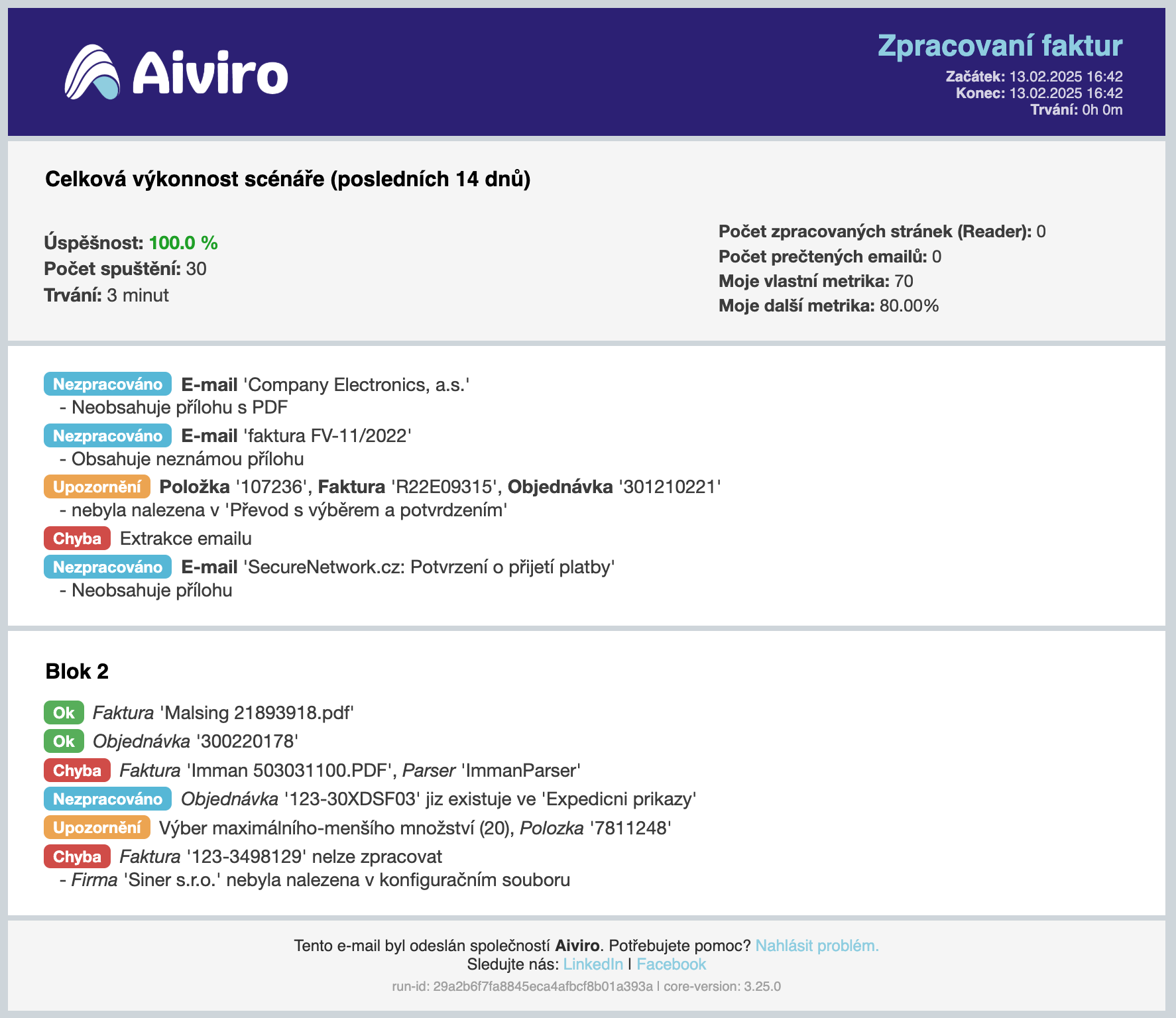
Example of e-mail report.
- report_html(metrics_config: EmailMetricsConfig | None = None) str
Returns html report
- send_report(recipients: ADDR_TYPE | None = None, logging_info: bool = True, prefect_artifact: bool = True, email_subject: str | None = None, email_attachments: list[str] | None = None, email_metrics: EmailMetricsConfig | None = None) None
Method generates and sends the report vie email client.
- Parameters:
recipients – E-mail recipients of the html report, priority over the notifier recipients
logging_info – If True, plain-text report is logged in INFO level
prefect_artifact – If True, Prefect artifact with markdown report is created
email_subject – Subject of them e-mail, if None
report_titleis used as subjectemail_attachments – List of paths to attach to the email
email_metrics – Configuration for performance section in the report
- property blocks: list[NotificationBlock]
Returns list of non-empty blocks. It can be used to check if report contains any messages.
- Example:
>>> from aiviro.modules.notifier import EmailNotifier
>>> en = EmailNotifier("<client>", "Invoice Processing", "robot.aiviro@aiviro.com")
>>> if en.blocks:
>>>     en.send_report(email_subject="Robot Report")
- create_block(title: str, block_id: str | None = None, sort_notifications: bool = False, style: Style | None = None, log_settings: NotifierLog | None = None, notification_titles: dict[NotificationType, str] | None = None) NotificationBlock
Creates new block/section in the report.
- Parameters:
title – Title of the block
block_id – Identifier of the block, if not set ‘title’ is used as identifier
sort_notifications – If True notification messages will be sorted in the block
style – Style to automatically format
Itemmessages.log_settings – Logging configuration for the block
notification_titles – Titles for notification types, if not set default titles are used
- custom(title: str, text: MSG_TYPE, m_type: NotificationType = NotificationType.INFO, log_settings: NotifierLog | None = None) Notification
Method creates custom notification message.
- Parameters:
title – Title of the message
text – Additional text of the message
m_type – Type of the notification, see
NotificationTypefor optionslog_settings – Logging configuration for the message
- Returns:
Notification object, to add additional messages
>>> from aiviro.modules.notifier import EmailNotifier, NotificationType
>>> en = EmailNotifier("<client>", "title")
>>> en.custom("Custom", "message text", NotificationType.INFO).add_sub_msg("Sub message")
"Custom - message text
    - Sub message"
- property default_block: NotificationBlock
Returns default
NotificationBlock
- error(msg: MSG_TYPE, log_settings: NotifierLog | None = None) Notification
Method creates ‘error’ (red) notification message in default block.
- Parameters:
msg – Standardized message object
log_settings – Logging configuration for the message
- Returns:
Notification object, to add additional messages
- Example:
>>> from aiviro.modules.notifier import EmailNotifier, Item
>>> en = EmailNotifier("<client>", "title")
>>> en.error(
...     Item("Objednávka", "RE-102-3539").text("neobsahuje požadované položky")
... ).add_sub_msg("položka DP-34101")
"Chyba - Objednávka 'RE-102-3539' neobsahuje požadované položky
    - položka DP-34101"
- get_block(block_id: str) NotificationBlock
Method to get
NotificationBlock- Parameters:
block_id – Identification of the notification block
- inactive(msg: MSG_TYPE, log_settings: NotifierLog | None = None) Notification
Method creates ‘inactive’ (gray) notification message in default block.
- Parameters:
msg – Standardized message object
log_settings – Logging configuration for the message
- Returns:
Notification object, to add additional messages
- Example:
>>> from aiviro.modules.notifier import EmailNotifier, Item
>>> en = EmailNotifier("<client>", "title")
>>> en.inactive(Item("Položka", "SU-1239-A"))
"Neaktivní - Položka 'SU-1239-A'"
- property last_block: NotificationBlock
Returns last created
NotificationBlock
- successful(msg: MSG_TYPE, log_settings: NotifierLog | None = None) Notification
Method creates ‘successful’ (green) notification message in default block.
- Parameters:
msg – Standardized message object
log_settings – Logging configuration for the message
- Returns:
Notification object, to add additional messages
- Example:
>>> from aiviro.modules.notifier import EmailNotifier, Item
>>> en = EmailNotifier("<client>", "title")
>>> en.successful(Item("faktúra", "310-231234"))
"Úspěšně zpracováno - Faktúra '310-231234'"
- unable_to_process(msg: MSG_TYPE, log_settings: NotifierLog | None = None) Notification
Method creates ‘unable to process’ (blue) notification message in default block.
- Parameters:
msg – Standardized message object
log_settings – Logging configuration for the message
- Returns:
Notification object, to add additional messages
- Example:
>>> from aiviro.modules.notifier import EmailNotifier, Item
>>> en = EmailNotifier("<client>", "title")
>>> en.unable_to_process(
...     Item("e-mail", "Invoice no.331343")
... ).add_sub_msg("Neznámý formát e-mailu")
"Nelze zpracovat - E-mail 'Invoice no.331343'
    - Neznámý formát e-mailu"
- warning(msg: MSG_TYPE, log_settings: NotifierLog | None = None) Notification
Method creates ‘warning’ (yellow) notification message in default block.
- Parameters:
msg – Standardized message object
log_settings – Logging configuration for the message
- Returns:
Notification object, to add additional messages
- Example:
>>> from aiviro.modules.notifier import EmailNotifier, Msg
>>> en = EmailNotifier("<client>", "title")
>>> en.warning(
...     Msg("Byl zpracován maximální počet položek")
... ).add_sub_msg("zpracovano 20/20")
"Upozornění - Byl zpracován maximální počet položek
    - zpracovano 20/20"
Notification Components
- class aiviro.modules.notifier.Notification(title: str, message: Msg, m_type: NotificationType, item_style: Style | None = None, log_settings: NotifierLog | None = None)
Notification object representing one message (possibly with sub messages) for
NotificationBlock.- add_sub_msg(text: MSG_TYPE, log_settings: NotifierLog | None = None) Notification
Adds sub message into the notification
- Parameters:
text – Text of the sub message
log_settings – Logging configuration for the message
- property notification_type: NotificationType
Type of the notification, one of
NotificationTypeoptions.- Getter:
Returns notification type
- Setter:
Sets type of the notification
- Example:
>>> from aiviro.modules.notifier import EmailNotifier, NotificationType, Item
>>> en = EmailNotifier("<client>", "Title", "mail@bs.com")
>>> msg = en.successful(Item("invoice", "600-123456"))
>>> # some code
>>> # change the successful message into error
>>> msg.notification_type = NotificationType.ERROR
- class aiviro.modules.notifier.NotificationBlock(blk_id: str, title: str, sort_notifications: bool = False, style: Style | None = None, default_scope: str = '', log_settings: NotifierLog | None = None, notification_titles: dict[NotificationType, str] | None = None)
Block/section of the section, containing corresponding notifications.
- Parameters:
blk_id – Identifier of the block
title – Title of the section
sort_notifications – If True notification messages will be sorted
- custom(title: str, text: MSG_TYPE, m_type: NotificationType = NotificationType.INFO, log_settings: NotifierLog | None = None) Notification
Method creates custom notification message.
- Parameters:
title – Title of the message
text – Additional text of the message
m_type – Type of the notification, see
NotificationTypefor optionslog_settings – Logging configuration for the message
- Returns:
Notification object, to add additional messages
- Example:
>>> from aiviro.modules.notifier import EmailNotifier, NotificationType
>>> en = EmailNotifier("<client>", "Title", "mail@bs.com")
>>> blk = en.create_block("supplier-1", "s1")
>>> blk.custom("Custom", "message text", NotificationType.INFO).add_sub_msg("Sub message")
"Custom - message text
    - Sub message"
- error(msg: MSG_TYPE, log_settings: NotifierLog | None = None) Notification
Method creates ‘error’ (red) notification message.
- Parameters:
msg – Standardized message object
log_settings – Logging configuration for the message
- Returns:
Notification object, to add additional messages
- Example:
>>> from aiviro.modules.notifier import EmailNotifier, Item
>>> en = EmailNotifier("<client>", "Title", "mail@bs.com")
>>> blk = en.create_block("supplier-1", "s1")
>>> blk.error(
...     Item("Objednávka", "RE-102-3539").text("neobsahuje požadované položky")
... ).add_sub_msg("položka DP-34101")
"Chyba - Objednávka 'RE-102-3539' neobsahuje požadované položky
    - položka DP-34101"
- inactive(msg: MSG_TYPE, log_settings: NotifierLog | None = None) Notification
Method creates ‘inactive’ (gray) notification message.
- Parameters:
msg – Standardized message object
log_settings – Logging configuration for the message
- Returns:
Notification object, to add additional messages
- Example:
>>> from aiviro.modules.notifier import EmailNotifier, Item
>>> en = EmailNotifier("<client>", "Title", "mail@bs.com")
>>> blk = en.create_block("supplier-1", "s1")
>>> blk.inactive(Item("faktúra", "310-231234"))
"Neaktivní - Faktúra '310-231234'"
- property item_style: Style | None
Default style setting using which
Itemtext is automatically formated.- Getter:
Returns style object
- Setter:
Sets style for item texts
- Example:
>>> from aiviro.modules.notifier import EmailNotifier, NotificationType, Item, Style
>>> en = EmailNotifier("<client>", "Title", "mail@bs.com")
>>> blk = en.create_block("New Block", "nb")
>>> blk.item_style = Style(bold=True)
>>> blk.successful(Item("invoice", "600-123456").item("email", "title of email"))
"Úspěšně zpracováno - **Invoice** '600-123456', **Email** 'title of email'"
- successful(msg: MSG_TYPE, log_settings: NotifierLog | None = None) Notification
Method creates ‘successful’ (green) notification message.
- Parameters:
msg – Standardized message object
log_settings – Logging configuration for the message
- Returns:
Notification object, to add additional messages
- Example:
>>> from aiviro.modules.notifier import EmailNotifier, Item
>>> en = EmailNotifier("<client>", "Title", "mail@bs.com")
>>> blk = en.create_block("supplier-1", "s1")
>>> blk.successful(Item("faktúra", "310-231234"))
"Úspěšně zpracováno - Faktúra '310-231234'"
- unable_to_process(msg: MSG_TYPE, log_settings: NotifierLog | None = None) Notification
Method creates ‘unable to process’ (blue) notification message.
- Parameters:
msg – Standardized message object
log_settings – Logging configuration for the message
- Returns:
Notification object, to add additional messages
- Example:
>>> from aiviro.modules.notifier import EmailNotifier, Item
>>> en = EmailNotifier("<client>", "Title", "mail@bs.com")
>>> blk = en.create_block("supplier-1", "s1")
>>> blk.unable_to_process(
...     Item("e-mail", "Invoice no.331343")
... ).add_sub_msg("Neznámý formát e-mailu")
"Nelze zpracovat - E-mail 'Invoice no.331343'
    - Neznámý formát e-mailu"
- warning(msg: MSG_TYPE, log_settings: NotifierLog | None = None) Notification
Method creates ‘warning’ (yellow) notification message.
- Parameters:
msg – Standardized message object
log_settings – Logging configuration for the message
- Returns:
Notification object, to add additional messages
- Example:
>>> from aiviro.modules.notifier import EmailNotifier, Msg
>>> en = EmailNotifier("<client>", "Title", "mail@bs.com")
>>> blk = en.create_block("supplier-1", "s1")
>>> blk.warning(
...     Msg("Byl zpracován maximální počet položek")
... ).add_sub_msg("zpracovano 20/20")
"Upozornění - Byl zpracován maximální počet položek
    - zpracovano 20/20"
- class aiviro.modules.notifier.NotificationType(value)
Default types for notification messages.
- INACTIVE = 0
Gray colored message
- SUCCESS = 10
Green colored message
- INFO = 20
Blue colored message
- WARNING = 30
Yellow colored message
- ERROR = 40
Red colored message
- class aiviro.modules.notifier.Msg(text: str = '', style: Style | None = None)
Main object to create a standardized message for e-mail notifications, see
EmailNotifier.- Parameters:
text – Initial text of the message
style – Style to format text
- Example:
>>> from aiviro.modules.notifier import Msg
>>> m = Msg("Text at the beginning")
>>> m.message
"Text at the beginning"
>>> m = Msg("Text at the beginning")
...     .item("Item", 'DP123-1').text("unable to process")
...     .item("Invoice", "300220178").text("has invalid format")
>>> m.message
"Item 'DP123-1' unable to process, Invoice '300220178' has invalid format"
- item(name: str, value: str, style: Style | None = None) Msg
Method to add custom item with its value.
- Parameters:
name – Name of the item, text is capitalized
value – String value of the item, text is formatted between two ‘
style – Style to format ‘name’ text, ‘value’ is not formatted
- Example:
>>> m = Msg("Some text").item('invoice', '310-12345').item('file', 'R234_12345.pdf')
>>> m.message
"Some text, Invoice '310-12345', File 'R234_12345.pdf'"
>>> m = Msg("Some text").item("Item", 'DP123-1', Style(bold=True))
>>> m.message
"Some text, **Item** 'DP123-1'"
- text(text: str, style: Style | None = None) Msg
Method to add additional text to the message.
- Parameters:
text – Text added to the final message, “space” is added in front of it. Empty string is ignored.
style – Style to format text
- Example:
>>> m = Msg("Some text").text("additional text")
>>> m.message
"Some text addtitional text"
>>> m = Msg("Bold text", Style(bold=True))
>>> m.message
"**Bold text**"
- class aiviro.modules.notifier.Item(name: str, value: str, style: Style | None = None)
Object to create a standardized message for e-mail notifications, see
EmailNotifier. Can be used instead ofMsg, when initial text is not required.- Parameters:
name – Name of the item, text is capitalized
value – String value of the item, text is formatted between two ‘
- Example:
>>> from aiviro.modules.notifier import Item
>>> m = Item("Item", "DP123-1")
>>> m.message
"Item 'DP123-1'"
>>> m = Item("Item", 'DP123-1').text("unable to process")
...     .item("Invoice", "300220178").text("has invalid format")
>>> m.message
"Item 'DP123-1' unable to process, Invoice '300220178' has invalid format"
>>> m = Item("Item", 'DP123-1', Style(bold=True)).text("unable to process")
>>> m.message
"**Item** 'DP123-1' unable to process"
- class aiviro.modules.notifier.Style(bold: bool = False, italic: bool = False)
Class to configure style of the message.
- class aiviro.modules.notifier.NotifierLog(logging_level: str, disable_logging: bool = False)
Class to configure logging of the notifier.
- class aiviro.modules.notifier.EmailMetricsConfig(*, displayed_metrics: set[str], translations: dict[str, str] = <factory>)
Configuration object for the email metrics.
- Parameters:
displayed_metrics – The metrics to display in the email
translations – The translations for the metrics,
keyis the metric name,valueis the translation This should be provided only for non-default metrics
List of available default metrics Metric Name
Description
api_ocr_calls
The number of OCR API calls
api_ouir_calls
The number of OUIR API calls
api_reader_documents
The number of documents processed by the reader
api_reader_pages
The number of pages processed by the reader
email_extracted
The number of emails extracted
email_sent
The number of emails sent
pdf_processed
The number of PDFs processed